

Never Suffer a Warm Drink Again: A Desktop Cooler Buying Guide
Why You Need a Desktop Drink Cooler at Your Workstation
A desktop drink cooler is a compact refrigeration device designed to keep beverages cold (and sometimes warm) right at your desk, workstation, or gaming setup. Here's what you need to know:
Quick Overview:
- What it is: A small, personal cooling unit that sits on your desk and keeps drinks at the perfect temperature
- How it works: Most use thermoelectric cooling (Peltier effect) or mini-compressor technology to chill beverages without taking up much space
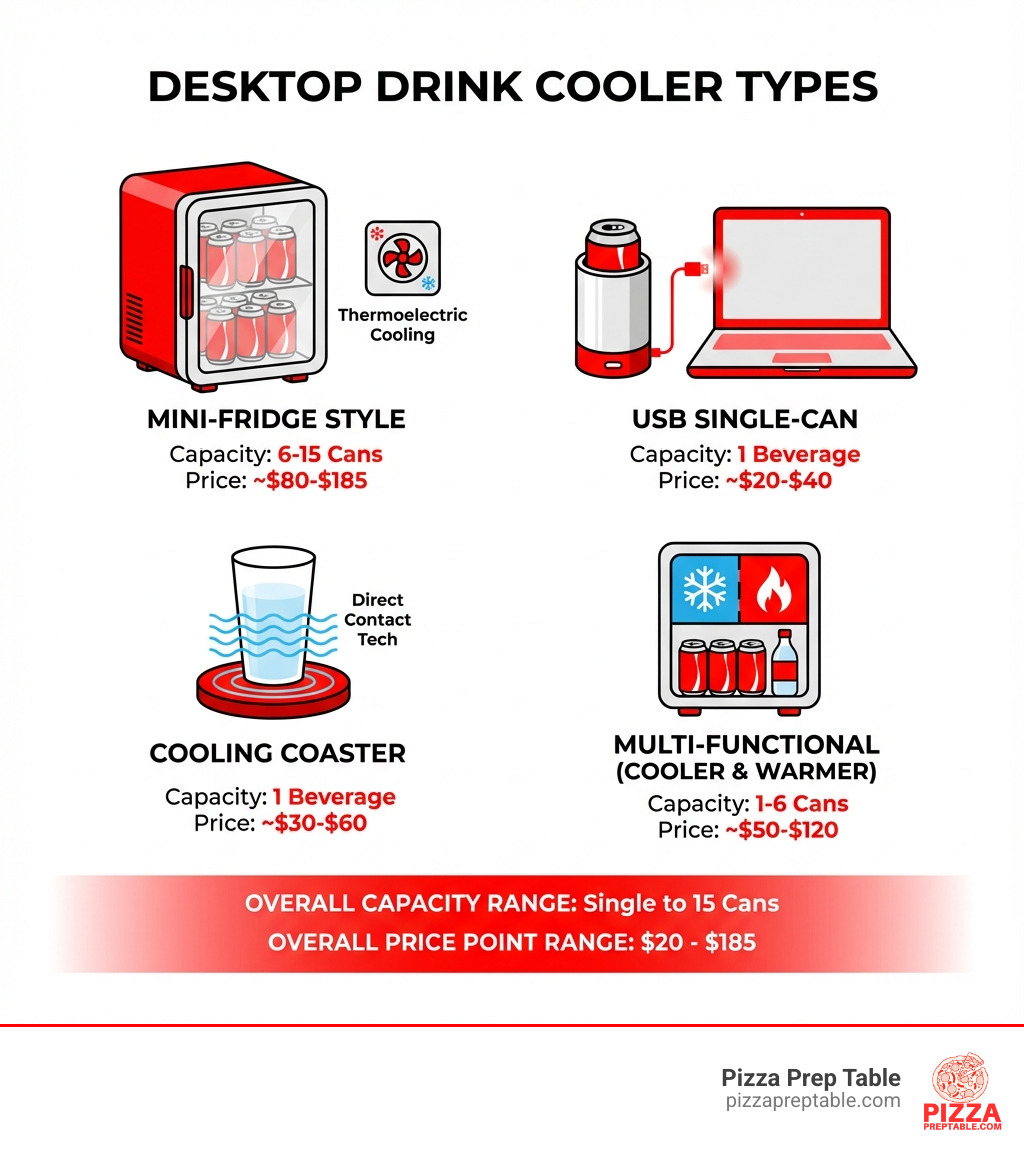
- Types available: Mini-fridge style (6-15 cans), single-can USB coolers, cooling coasters, and multi-functional cooler/warmers
- Price range: $20-$185, depending on capacity and features
- Best for: Home offices, gaming setups, dorm rooms, small workshops, and personal workspaces
Picture this: You're in the middle of a long shift managing your pizzeria's lunch rush. You reach for your drink, only to find it's gone warm and flat. There's nothing worse than a lukewarm beverage when you're working hard.
That's where desktop drink coolers come in. These compact devices have exploded in popularity, especially with the rise of home offices and personal workspaces. They're not just for drinks either—people use them for skincare products, cosmetics, and even small food items that need refrigeration.
The market has responded with incredible variety. You can find everything from USB-powered single-can coolers that draw power from your laptop to mini-fridge style units that hold up to 15 cans. Some models offer both cooling and warming functions, making them useful year-round for cold drinks in summer and hot coffee in winter.
I'm Sean Kearney, and through my years in sales and working with foodservice equipment at Amazon and beyond, I've seen how the right cooling solution can transform a workspace—which is why understanding desktop drink cooler options matters whether you're outfitting a small office or just want personal convenience at your desk.
What is a Desktop Drink Cooler and How Does It Work?
At its core, a desktop drink cooler is a miniaturized refrigeration unit designed for personal use, typically right at your workstation. Unlike the large commercial beverage coolers we might supply for a busy pizzeria, these are all about individual convenience and compact design. The primary goal? To keep your favorite beverage perfectly chilled, or sometimes even warm, without you ever having to leave your seat.
Most desktop drink coolers use one of two main cooling technologies:
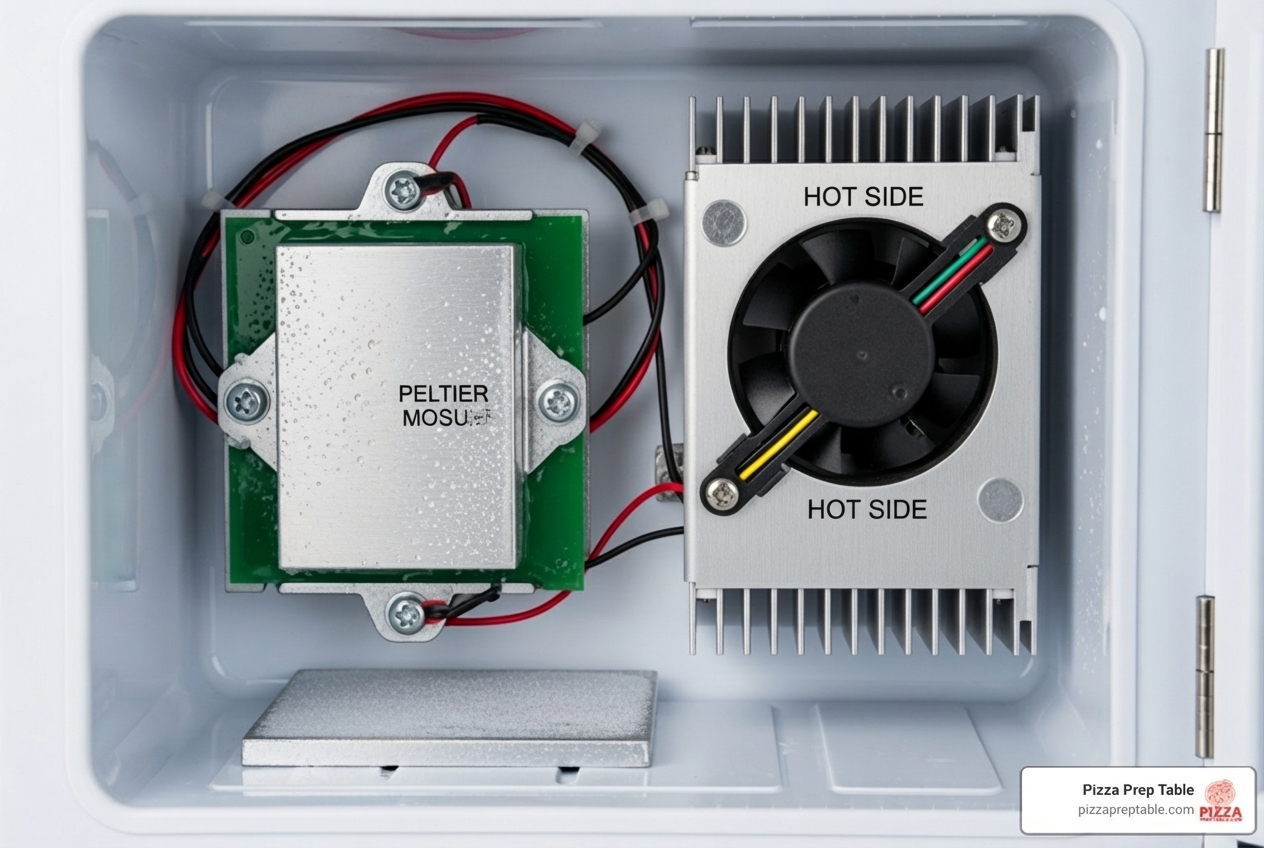
Thermoelectric Cooling (Peltier Effect): This is the most common method you'll find in smaller, more affordable desktop drink coolers. It works on the principle of the Peltier effect, where an electric current passes through two dissimilar conductors, creating a temperature difference. One side gets cold, the other gets hot. The cold side is directed towards the interior of the cooler, while the hot side dissipates heat, usually with the help of a small fan. This method is quiet, compact, and energy-efficient for small loads, making it ideal for personal coolers. It's generally not as powerful as compressor-based systems, meaning it cools to a certain temperature below ambient, rather than reaching a precise low temperature regardless of the room. This makes them great for maintaining coldness but slower at chilling warm drinks.
Mini-Compressor Technology: Less common in the smallest desktop drink cooler models but present in larger mini-fridge style units, compressor technology works much like a full-sized refrigerator. A refrigerant gas is compressed, cooled, expanded, and then evaporated, absorbing heat from the cooler's interior. This method offers more powerful and consistent cooling, often able to reach lower temperatures more quickly, regardless of the ambient room temperature. However, compressor units tend to be larger, heavier, and can be slightly noisier than thermoelectric models.
Powering these handy devices is usually straightforward. Many compact models are USB-powered, drawing electricity directly from your computer, a power bank, or a USB wall adapter. This makes them incredibly versatile and portable. Larger units, particularly the mini-fridge style ones, typically use standard AC power (plugging into a wall outlet) or sometimes DC power (12V car adapters) for on-the-go use.
Compared to commercial refrigeration solutions, which are built for high volume and rigorous demands, desktop drink coolers prioritize personal space and immediate access. They aren't designed to store large quantities or to rapidly chill dozens of items, but rather to serve as your personal beverage concierge. For a broader understanding of how different cooling methods stack up, you might find our Beginners Guide to Comparing Beverage Coolers insightful, even if it digs into larger systems.
The Top 4 Types of Desktop Drink Coolers
The market for desktop drink coolers is booming, reflecting a growing trend toward personalized comfort and convenience in our workspaces. This means there's a fantastic array of options available, each with its unique benefits. Let's explore the four main types you'll encounter.
The Mini-Fridge Style Cooler
These are perhaps the most recognizable form of desktop drink cooler, resembling a miniature version of the refrigerator in your kitchen. They're designed to hold multiple cans or bottles, offering a bit more storage than their single-serve counterparts. We've seen a significant increase in demand for these compact and energy-efficient models, especially for home offices and personal workspaces.
Capacities typically range from 4 liters (holding about 6 standard cans) to 10 liters (fitting around 15 cans). Brands like Frigidaire and CROWNFUL offer popular models in this category, often featuring retro designs or sleek modern aesthetics. For example, the Frigidaire Retro 10L, 15-Can Mini Personal Fridge Cooler, priced around $48.98, has garnered thousands of positive reviews, showing its popularity. The Frigidaire Retro 6 Can Mini Beverage/Skincare Cooler (4L) is another popular choice, often available for under $25.
Beyond just drinks, these mini-fridges are increasingly adopted for storing skincare products, cosmetics, and even small snacks. Their portability, often featuring a handle and sometimes a car adapter, makes them versatile for use in dorm rooms, bedrooms, or even for road trips. You can browse a wide selection of these versatile units on platforms like Walmart's Desktop Drink Cooler page.
The Single-Can USB Desktop Drink Cooler
For those who need ultimate compactness and immediate access to a single chilled beverage, the single-can USB desktop drink cooler is a game-changer. These pint-sized coolers are designed to cradle one standard-sized can, keeping it refreshingly cold right beside your keyboard.
Their key feature is their power source: they plug directly into a USB port on your computer, gaming console, or even a USB hub. This "plug-and-play" functionality means no extra wall outlets are needed, making them incredibly convenient for busy desks, cubicles, or even during long gaming sessions. A USB cooler prevents the disappointment of reaching for a pre-chilled drink only to find it has become warm, ensuring your beverage stays cool throughout your marathon session.
These units are particularly popular for their versatility and ease of use in various settings. They are perfect for gamers, students in dorms, or anyone who spends long hours at their computer and wants a constantly cold drink within arm's reach. You can find examples of these compact cooling solutions, sometimes even offering warming functions, like those highlighted on StereoTech's Mini USB PC Drink Cans Cooling page.
The Cooling Coaster (or Cup Holder)
Taking minimalism to the next level, the cooling coaster is designed for direct-contact chilling of your beverage. Instead of enclosing the entire can or bottle, these devices feature a chilled plate or surface upon which you place your drink. This direct contact allows for very efficient and often rapid cooling of the liquid inside.
These compact units are perfect for those with limited desk space, offering a discreet way to keep a single drink cool. Many models are designed to fit perfectly into existing cup holders on desks or even in cars, providing a smart solution to beverage temperature control. We've seen variations that are merely cooling plates, while others are integrated into a cup-shaped holder.
The primary benefit here is the small footprint and the ability to quickly cool a drink. While they won't maintain the chill as long as an enclosed mini-fridge once removed, they excel at keeping your current beverage at an optimal temperature. Some even come with adaptors for different can and bottle sizes, ensuring a snug fit and maximum cooling efficiency.
The Multi-Functional Cooler & Warmer
Why settle for just cold when you can have hot too? The demand for multi-functional desktop drink coolers that offer both cooling and warming capabilities is definitely on the rise. These versatile gadgets are the Swiss Army knives of personal beverage temperature control, allowing you to switch between keeping a soda frosty and your coffee piping hot with the flip of a switch.
This dual functionality makes them incredibly useful year-round. Imagine having a refreshing iced tea during a hot summer afternoon and then switching to a warm mug of cocoa on a chilly winter evening, all from the same device on your desk. Many USB-powered models, like the HQF® Mini USB-Powered Beverage Drink Cans Cooler/Warmer, offer this convenient two-in-one feature. Some even boast additional functions like fermentation for specialized beverages, though these are less common in desktop models.
The ability to both cool and warm a beverage on demand caters to a wider range of preferences and makes these units a smart investment for those who enjoy both hot and cold drinks throughout their day. This versatility is a key feature driving consumer choice, reflecting a desire for appliances that can adapt to various needs and seasons. You can explore products that offer this dual capability, such as those listed on Xoxide's USB Beverage Chiller / Warmer page.
How to Choose the Best Desktop Drink Cooler for You
Selecting the perfect desktop drink cooler isn't just about grabbing the first one you see. It's about finding the right balance of features, performance, and aesthetics to fit your specific needs and workspace. With so many options available, from the mini-fridge style to the single-can USB cooler, we encourage you to consider what truly matters for your daily routine. Key features driving consumer choice include cooling capacity, noise level, energy efficiency, and aesthetic design, and we'll break these down for you.
| Feature | Mini-Fridge Style | Single-Can USB Cooler | Cooling Coaster | Multi-Functional Cooler & Warmer |
|---|---|---|---|---|
| Cooling Power | Good (Thermoelectric/Mini-Compressor) | Moderate (Thermoelectric) | Good (Direct Contact) | Good (Thermoelectric) |
| Capacity | 6-15 cans/bottles | 1 can | 1 can/cup | 1 can/cup (often) |
| Portability | Moderate (with handle/car adapter) | High (USB powered) | High (Compact) | High (USB powered) |
| Price Range | $25 - $185 | $20 - $45 | $30 - $60 | $30 - $70 |
Key Features to Consider
When you're looking to bring a desktop drink cooler into your personal or professional space, a few critical features should guide your decision:
- Cooling Temperature Range: How cold do you like your drinks? Most thermoelectric models cool to about 20-30°F below ambient temperature. If your office is 75°F, your drink might get down to 45-55°F. Mini-compressor units, though rarer and pricier for desktop use, can often reach lower, more consistent temperatures, sometimes even below freezing. Always check the manufacturer's specifications for the expected temperature drop.
-
Capacity: This is a big one. Do you need to keep a single can cold for a few hours, or do you want to stash a day's worth of beverages (or skincare items)?
- Single-can coolers are perfect for minimalists or those with very limited space.
- Mini-fridge style coolers (4L/6-can to 10L/15-can) are ideal if you need a few drinks on hand or want to store snacks, cosmetics, or medicines.
-
Portability: If you plan to move your cooler between your home office and your car, or take it to a friend's place for a gaming night, look for features like:
- Lightweight design and a sturdy handle.
- Dual power options: Many come with both AC adapters for home/office and DC (12V) adapters for car use. USB-powered units are the most portable in terms of power flexibility.
- Power Source: As we discussed, USB is great for convenience with your computer, while AC power offers more consistent performance for larger units. Some models offer both for maximum flexibility.
For those considering larger-scale refrigeration needs, whether for a commercial kitchen or a robust home bar, it's helpful to understand the principles of efficient cooling. You can find More info about countertop refrigeration on our site, which provides a deeper dive into the science behind keeping things cool.
Price, Energy, and Maintenance Considerations
The investment in a desktop drink cooler is generally quite modest, but it's worth understanding the long-term implications of your choice.
-
Typical Price Range: For most personal desktop drink coolers, you can expect to pay anywhere from $20 to $150.
- Single-can USB coolers and basic cooling coasters often fall in the $20-$45 range.
- Mini-fridge style units (6-15 can capacity) usually range from $25-$100, with features like retro design or advanced cooling pushing them higher.
- Multi-functional cooler/warmers typically land between $30-$70.
While some beverage coolers on platforms like Amazon can go for hundreds or even thousands, these are generally larger, commercial-grade units or specialized wine fridges, not what we'd typically call a "desktop" cooler. You can explore many options and their price points by searching for
[desk drink cooler](https://www.walmart.com/c/kp/desktop-drink-cooler)online.
- Energy Efficiency: Most desktop drink coolers are relatively low-power devices. Thermoelectric models, especially USB-powered ones, consume very little electricity, often just a few watts (e.g., 5-10W for a USB cooler, up to 40-60W for a small mini-fridge). This means their impact on your electricity bill is minimal. Mini-compressor units will use more power but are still far more efficient than a full-sized refrigerator. When comparing models, look for wattage ratings to understand their consumption. The growing market demand for energy-efficient models means manufacturers are constantly improving in this area.
-
Noise Levels: This is a crucial factor, especially if your desktop drink cooler will be sitting right next to you for hours.
- Thermoelectric coolers are generally quiet, but they still have a small fan to dissipate heat. Some fans can produce a low hum. Look for models advertised as "silent" or check user reviews for comments on noise.
- Mini-compressor coolers can be louder when the compressor cycles on, but they are typically more efficient at maintaining temperature, so they don't run constantly. User reviews are an excellent resource for gauging real-world noise levels before you buy.
-
Cleaning Tips: Maintenance for these small units is usually simple.
- Wipe down the interior regularly with a damp cloth and mild soap to prevent odors and spills.
- For thermoelectric units, occasionally dust the fan vents to ensure proper heat dissipation.
- If your cooler tends to accumulate frost (more common in mini-compressor models or if left open frequently), defrost it periodically by unplugging it and letting the ice melt, then wiping it clean. This ensures optimal performance and longevity.
Frequently Asked Questions about Desktop Drink Coolers
We hear a lot of questions about these handy little devices. Let's tackle some of the most common inquiries to help you make an informed decision and enjoy your perfectly chilled beverages.
What are the best use cases for a desktop drink cooler?
The beauty of a desktop drink cooler lies in its versatility and its ability to bring personalized comfort right to your fingertips. We've seen them adopted in a multitude of settings:
- Home Office: With more people working remotely, having a cold drink within arm's reach without interrupting your workflow is a huge benefit. It adds a touch of convenience that can boost productivity.
- Gaming Setup: Long gaming sessions demand constant hydration. A desktop drink cooler ensures your energy drink or soda stays ice-cold, letting you focus on the game without trekking to the kitchen. This is a primary driver for the popularity of portable and USB-powered models.
- Dorm Room: Space is at a premium in dorms. A compact desktop drink cooler is perfect for keeping beverages and small snacks chilled without taking up valuable floor space or requiring a full-sized mini-fridge.
- Small Workshops/Craft Rooms: For hobbyists spending hours on projects, a cold drink is a welcome refreshment.
- Cubicle/Personal Workspaces: Even in traditional office environments, these coolers offer a personal touch, ensuring your drink is always at your preferred temperature.
- Skincare Storage: Many people use mini-fridge style coolers for cosmetics and skincare products that benefit from being kept cool, like serums or face masks.
- Travel/Car Use: Models with DC adapters are fantastic for road trips, keeping drinks cool on the go.
While these are designed for personal use, the principle of having cold beverages readily available is something we understand well in the foodservice industry. For commercial establishments, the challenge scales up significantly, requiring robust solutions like those discussed in our Bottle Cooler Breakdown: Finding Your Bar's Perfect Fridge.
Can a desktop cooler make a room-temperature drink cold?
Yes, most desktop drink coolers can make a room-temperature drink cold, but it's important to manage expectations regarding speed and final temperature.
- Cooling Capability: The primary technology in most desktop units, thermoelectric cooling, works by drawing heat away from the inside. This means they will cool down a warm drink.
- Time to Cool: Unlike a freezer or a powerful compressor fridge, thermoelectric coolers don't chill instantly. It can take anywhere from 30 minutes to a few hours for a room-temperature drink to reach its optimal coldness, depending on the cooler's power, the starting temperature of the drink, and the ambient room temperature.
- Ambient Temperature Effect: Thermoelectric coolers perform best in cooler environments. If your room is very warm (e.g., 80°F+), the cooler will struggle more to achieve very low temperatures, as it has to work harder against the surrounding heat.
- Thermoelectric Limitations: They are generally better at maintaining an already cold temperature than rapidly chilling a warm one. For the quickest chill, we still recommend pre-chilling your beverages in a standard refrigerator if possible, then transferring them to your desktop drink cooler to keep them frosty.
Are desktop drink coolers noisy?
The noise level of a desktop drink cooler is a significant consideration, especially since it sits so close to your workspace. We know that a constant hum or buzz can be distracting during focused work or intense gaming.
- Fan Noise: The vast majority of desktop drink coolers, particularly thermoelectric models, use a fan to dissipate heat. This fan is the primary source of noise. While generally small and designed to be quiet, the sound can range from a barely noticeable whisper to a low hum, depending on the model and its age.
-
Thermoelectric vs. Compressor Noise:
- Thermoelectric coolers tend to be quieter overall because they lack a compressor. However, their fans run continuously when cooling.
- Mini-compressor coolers (less common for true "desktop" size, but seen in larger mini-fridge types) will have periods of silence when the compressor is off, but can produce a distinct hum or whirring sound when the compressor kicks in. This on-off cycling might be more noticeable to some than a continuous fan hum.
- Decibel Levels: Manufacturers sometimes provide decibel (dB) ratings. Below 30-35 dB is generally considered very quiet. User reviews are often the best indicator of real-world noise levels, as individual perceptions can vary. If noise is a major concern for you, we recommend prioritizing models with "quiet operation" in their description and checking multiple customer reviews for feedback on this specific aspect.
Conclusion: Upgrade Your Desk, Upgrade Your Drink
In today's world, where many of us spend significant hours at our desks, the simple luxury of a perfectly chilled beverage can make a big difference. A desktop drink cooler isn't just an indulgence; it's an investment in your personalized comfort, a productivity booster, and a convenient solution to keep your favorite drinks (or even skincare items) just right.
From the compact single-can USB coolers perfect for gamers to the versatile mini-fridge style units that hold a few drinks and snacks, there's a desktop drink cooler designed for almost every need and workspace. We've explored how they work, the different types available, and the key features to consider – from cooling capacity and noise levels to energy efficiency and price. The market continues to grow, with increasing demand for models that are compact, energy-efficient, and multi-functional, offering both cooling and warming capabilities.
So, whether you're battling virtual enemies, crunching numbers, or simply enjoying a quiet afternoon at home, say goodbye to lukewarm drinks. Upgrade your desk, upgrade your drink, and enjoy the refreshing convenience that a desktop drink cooler brings.
For those with larger-scale beverage cooling needs, perhaps for a restaurant, bar, or commercial kitchen that requires robust and reliable refrigeration, we at PizzaPrepTable.com are your go-to experts. While a desktop cooler handles personal sips, we specialize in comprehensive solutions. Explore our range of shallow beverage refrigerators and other commercial refrigeration equipment designed to keep your entire operation running smoothly and efficiently.